 Christmas Mega Sale – Enjoy Up to 50% OFF on Every Plan!
Quick Answer: HTML validation checks your code against W3C and WHATWG rules to find hidden errors like unclosed tags and duplicate IDs. It helps pages display consistently across browsers and keeps them readable for screen readers and search engines. Paste your code or URL into an HTML validator to check it.
You finish a webpage, open it in Chrome, and everything seems perfect.
Then, you open it in Safari and find out that part of the page behaves differently. You reload the page, check your code, and everything “looks fine”.
The problem isn’t usually visible to your eyes. It’s in your HTML.
Browsers are very forgiving. When they find broken HTML, they guess what you meant and fix it on the fly.
This may sound helpful. But it means small mistakes can stay hidden for months unless they show up as a broken layout or a page search engines can’t make sense of.
That’s exactly why HTML validation exists. Below, we’ll explore why it matters and how to perform it in under a minute.
Why is HTML Validation Important in Web Development?
HTML validation simply means checking your code against the official rules of HTML (which are defined by the W3C and the WHATWG HTML Standard) to make sure everything is written correctly.
Here are the reasons HTML validation matters.
Catches Hidden/Silent Errors
The biggest problem with bad/missing/incorrect HTML is that it’s often hard to identify.
Browsers can handle such small mistakes. They are built this way.
If you forget to close a tag, the browser will itself guess where it should end and render the page. Everything looks normal, but the error is still inside the code.
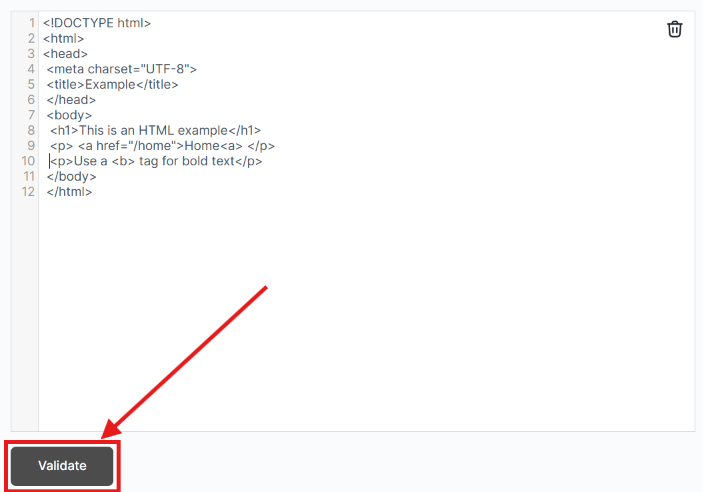
Here is a classic example:

Did you spot it? The “<a>” tag is not closed.
The browser will make guesses. And in this case, it’ll likely treat the entire second paragraph as part of the link. Your page now has a giant, invisible clickable area.
It may not appear in your design. Your browser console may also stay quiet about it, but validation can spot the mistake so you can fix it and make your code flawless.
Consistent Display in Every Browser
Here is something many developers learn the hard way. Not all browsers fix the broken HTML the same way when they find it.
Chrome (Blink), Safari (WebKit), and Firefox (Gecko) each one has its own logic of “error recovery.
The same unclosed or misnested element can be repaired differently depending on the browser. This means that the same page can produce different structures (DOMs) on different browsers.
An unclosed “<li” inside a menu can merge two items into one. This may happen in one browser but not in another.
Validation totally removes this guessing. It saves you from the trouble that may happen later. When your code follows the rules, browsers are more likely to interpret its structure consistently. This reduces the chances of problems caused by malformed markup.
Better Accessibility and SEO
HTML is not just for browsers. Machines like screen readers and search engine crawlers also read it. And they are much less forgiving compared to browsers.
- Accessibility. Screen readers rely on the page’s structure (which is called the accessibility tree). If tags are misnested/elements are missing proper attributes, a screen reader may misinterpret the page structure or skip important information.
- SEO. Search engines also parse your HTML code to understand your content. A broken HTML structure (like an unclosed tag that swallows half your page into a link, or duplicated `id` attributes) can cause the crawlers to misunderstand your headings, links, or content hierarchy.
Clean, valid HTML helps search engines parse your page structure and content more reliably.
Faster Debugging and Easier Maintenance
An unclosed tag even 300 lines above can cause a completely irrelevant bug far below.
It can result in a layout that won’t align or a style that refuses to apply. Manually hunting it down can take hours.
HTML validation totally changes that. Rather than guessing, you get a precise report. Here’s a hypothetical example:
“Tag must be paired, missing `</div>`, start tag matched on line 47”
You go straight to line 47, fix it, and job done.
Teams can even add HTML validation to their build pipeline so that broken HTML code never reaches production in the first place.
How to Perform HTML Validation Quickly
For your everyday work, the quickest HTML validation method is using an online HTML Validator. It checks your code against W3C rules and shows you exactly what’s wrong and where. You don’t need to install software, create an account, or set up a coding environment.
The whole process takes just a few minutes. Here it is step by step:
First of all, open the validator tool. Copy your HTML code and paste it into the tool’s input box. You may also upload the HTML code as a file.
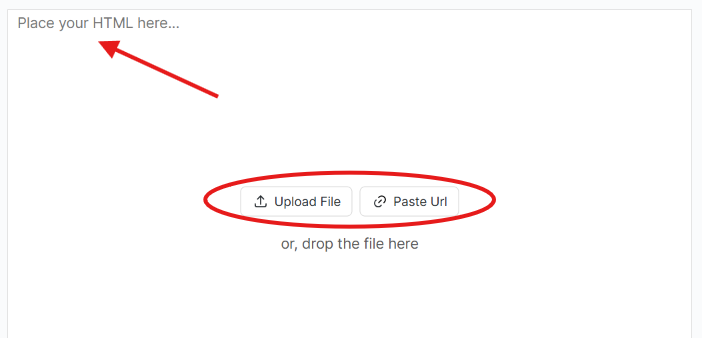
Once the code is inside that input field, simply click on the “Validate” button below.
As soon as you hit that button, you’ll get the result. Here’s the one in our case:
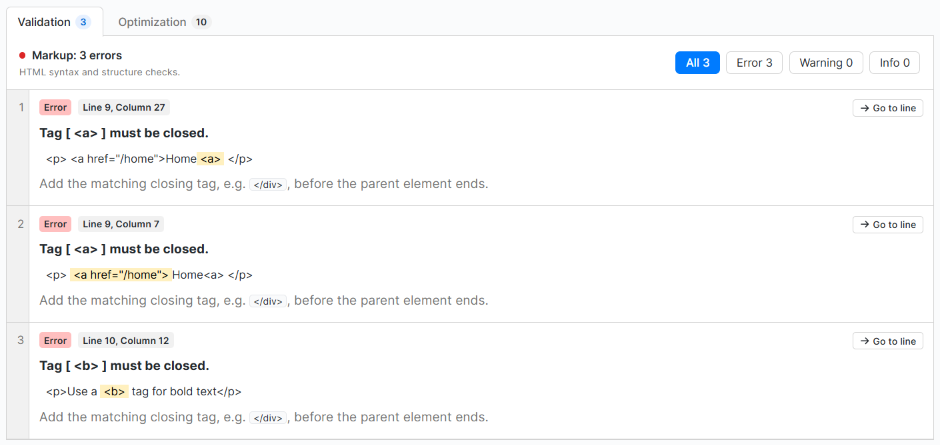
There were 3 markup errors. And also, 10 optimization errors:
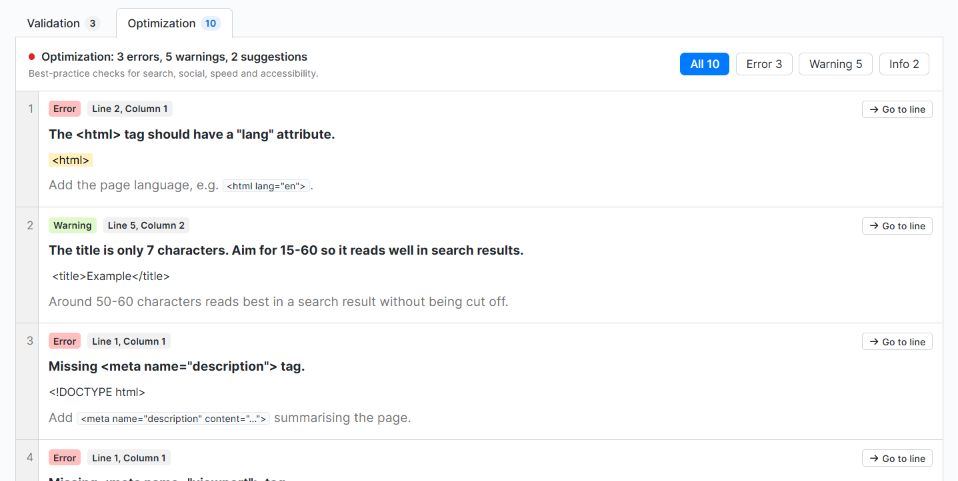
Each error gives its line and column number. There’s also a type for each error and a description of the problem given.
You can simply click on the “Go to line” button on each error to jump directly to the line of code where the error is found.

Fix the issues in your code, and after that, don’t forget to revalidate everything.
Here, the most common question that arises in users’ minds is “How can we validate an already live page?” To do that, you can simply copy your live page’s URL, paste it into the validator, and the tool spots the errors (if found).
Common Validation Errors and How to Fix Them
|
Error |
What it looks like |
The fix |
|
Unclosed tag |
<p>Some text |
Add the closing tag: <p>Some text</p> |
|
Misnested tags |
<b><i>text</b></i> |
Close in reverse order: <b><i>text</i></b> |
|
Unescaped characters |
5 < 10 or Tom & Jerry |
5 < 10 and Tom & Jerry |
|
Missing alt on images |
<img src=”cat.jpg”> |
Add a description: <img src=”cat.jpg” alt=”A gray cat sleeping”> |
|
Duplicate IDs |
Two elements with id=”menu” |
IDs must be unique; rename one |
|
Obsolete elements |
<font>, <center>, <big> |
Use CSS instead: style=”color: red; text-align: center;” |
|
Missing lang attribute |
<html> |
Tell browsers the language: <html lang=”en”> |
|
Deprecated attributes |
<table border=”1″> |
Move styling to CSS |
The Bottom Line
Don’t treat HTML validation as a formality.
It helps you move beyond hoping your page works across browsers and devices by catching markup problems before they cause issues.
Validating HTML means hidden errors get caught before users are affected by it. And this process costs you nothing but a few minutes.
Faq’s
Q1. What is HTML validation?
HTML validation checks your code against the official HTML rules set by the W3C and WHATWG. It finds mistakes like unclosed tags, misnested elements and duplicate IDs, and shows the line where each one is.
Q2. Does HTML validation affect SEO?
Not directly. Google has said valid HTML is not a ranking factor. However, broken markup can confuse crawlers about your headings, links and content structure, so clean HTML helps search engines read your page correctly.
Q3. Is HTML validation mandatory?
No. Browsers will still display pages with errors. But validation catches hidden problems early, before they turn into layout bugs, accessibility issues or cross-browser differences.
Q4. What is the difference between an error and a warning?
An error means the code breaks an HTML rule, such as a missing closing tag. A warning points to something that works but could cause problems or isn’t best practice, such as a very short page title.
Q5. Can I validate a live website?
Yes. Paste the page URL into the HTML validator instead of the code. The tool fetches the page and lists any errors it finds.
Q6. How often should I validate my HTML?
Validate before publishing a new page and after any major code change. Teams can also add HTML validation to their build pipeline so broken code never reaches the live site.
Q7. Does valid HTML mean my page is fully accessible?
No. Validation checks that your code follows HTML rules. It won’t catch every accessibility issue, like poor color contrast or unclear link text, so run an accessibility check as well.
Q8. Does an HTML validator check CSS and JavaScript too?
No. An HTML validator checks only the HTML markup. CSS needs a separate CSS validator, and JavaScript errors show up in the browser console or in code linters.
Q9. What are the most common HTML validation errors?
The most common ones are unclosed tags, misnested tags, missing alt text on images, duplicate IDs, unescaped characters like & and <, and obsolete tags like <font> and <center>.



