chirstmas tree Christmas Mega Sale – Enjoy Up to 50% OFF on Every Plan! Get Now chirstmas snow

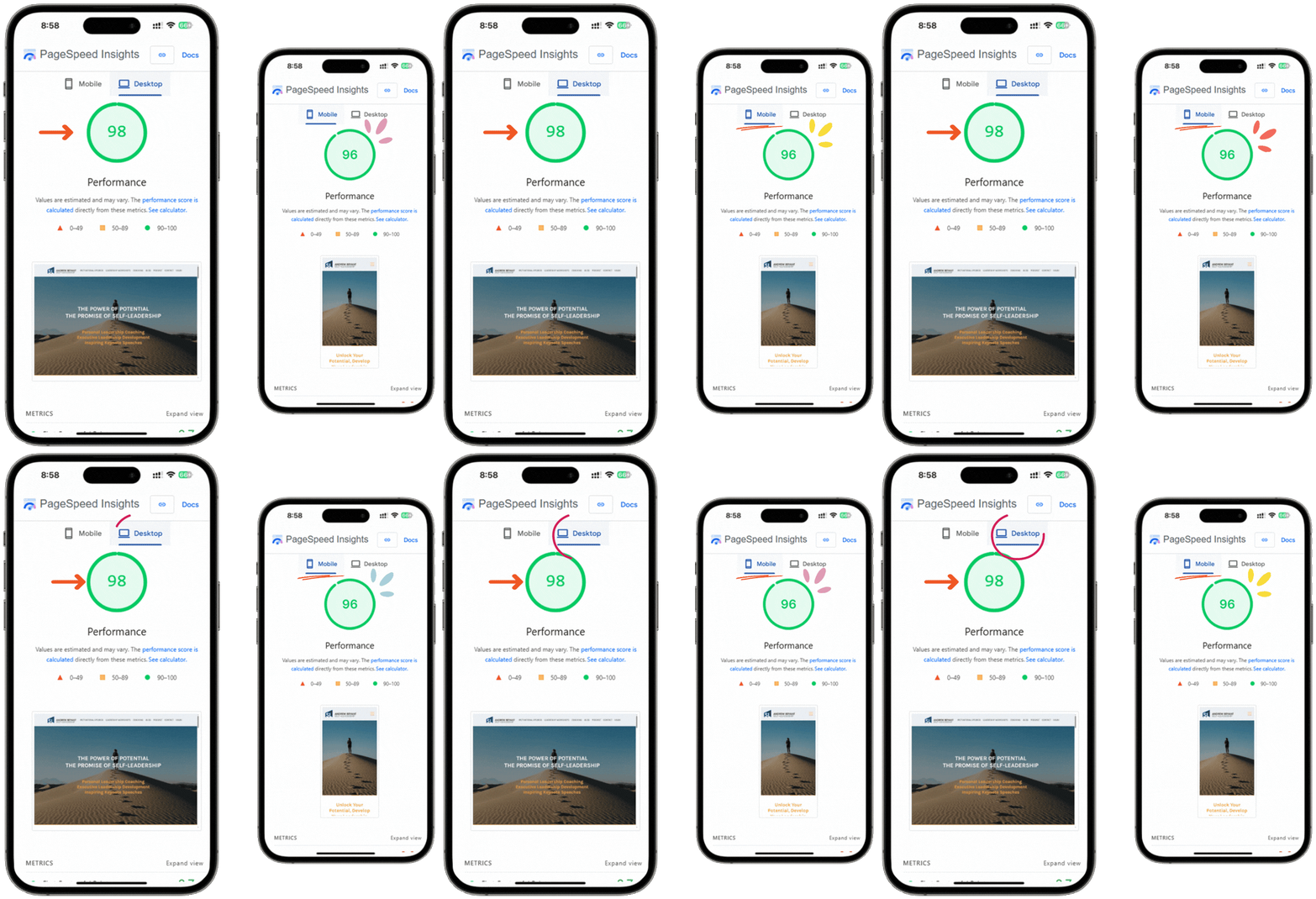
Google PageSpeed Insights performance improvement demonstration
Google PageSpeed Insights optimization results.

Professional WordPress Speed Optimization Service

Every optimization is hands-on and tailored to your site’s theme, plugins, and hosting environment — not a one-click automated scan.

WordPress Speed Optimization Benefits

Improve Google PageSpeed Insights Score

We target the exact factors PageSpeed Insights measures…

Pass Core Web Vitals

We optimize Largest Contentful Paint (LCP), INP and CLS…

Improve GTmetrix Performance

Optimizations are validated against GTmetrix’s Grade A benchmark…

Reduce Website Load Time

Manual code-level optimization brings load time under two seconds…

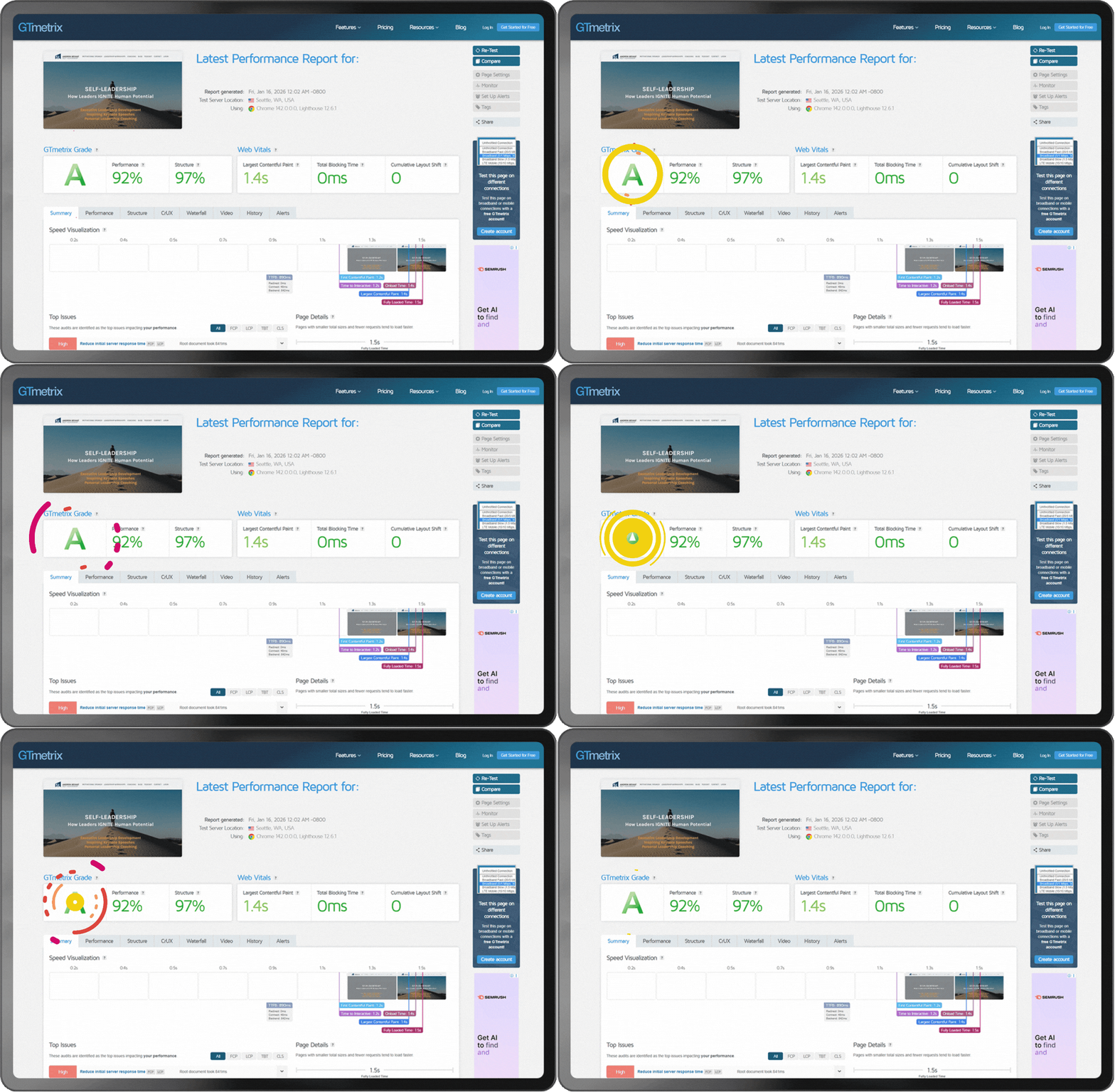
GTmetrix Performance Improvement
GTmetrix score improvement after WordPress optimization.

Why Website Speed Matters

Speed isn’t just a technical metric—it directly shapes how your site ranks, converts, and retains visitors.

Benefits of Website Speed

  • Improve Search Rankings

    Google includes Core Web Vitals as part of its page experience ranking signals.

  • Increase Conversion Rates

    Faster pages reduce friction during checkout, sign-up, and lead generation.

  • Reduce Bounce Rate

    Faster loading pages keep visitors engaged longer.

  • Enhance User Experience

    Smooth interactions create a better browsing experience.

  • Improve Mobile Performance

    Mobile-specific optimization improves Core Web Vitals on smartphones.

WordPress speed optimization services
Illustration of WordPress optimization techniques.

What Is Included in Our WordPress Speed Optimization Service

A full, manual optimization pass touches every layer of your site.

Optimization Services Included

  • Image Optimization

    Compress and convert images to modern formats like WebP without visible quality loss.

  • JavaScript Optimization

    Minify, defer, and eliminate unused JavaScript that blocks rendering.

  • CSS Optimization

    Remove unused CSS rules and minify stylesheets to cut page weight.

  • Critical CSS Generation

    Inline the CSS needed for above-the-fold content so the page paints faster.

  • Database Optimization

    Clean up post revisions, transients, and bloated database tables that slow queries.

  • Browser Caching

    Configure caching headers so returning visitors load pages near-instantly.

  • Server Optimization

    Tune server and PHP-level configuration to lower Time to First Byte (TTFB).

  • CDN Configuration

    Set up or configure a content delivery network so assets load fast from anywhere.

  • Lazy Loading

    Defer offscreen images, videos, and iframes until visitors actually scroll to them.

  • Font Optimization

    Preload and subset web fonts to remove render-blocking font requests.

  • Plugin Optimization

    Identify, replace, or reconfigure slow plugins without breaking site functionality.

  • Core Web Vitals Optimization

    Target LCP, INP, and CLS directly, not just the aggregate PageSpeed score.

Common WordPress Performance Problems We Fix

These are the issues our audits find most often on slow WordPress sites:

Common WordPress Performance Problems

  • Slow First Contentful Paint (FCP)

    Delayed rendering of the first visible content, usually caused by render-blocking CSS and JavaScript.

  • Poor Largest Contentful Paint (LCP)

    The largest visible element — often a hero image or heading — takes too long to load and display.

  • High Time to First Byte (TTFB)

    Slow server response before the browser even starts receiving page content.

  • Render Blocking Resources

    CSS and JavaScript files that stop the page from displaying until they finish loading.

  • Unused CSS & JavaScript

    Bloated theme and plugin code that ships to every page even when it’s never used.

  • Large Images

    Uncompressed, oversized images that add unnecessary page weight.

  • Too Many HTTP Requests

    Excess scripts, stylesheets, fonts, and plugin assets that multiply page load requests.

  • Poor Hosting Configuration

    Hosting environments not tuned for WordPress, leading to slow queries and high TTFB.

  • Plugin Conflicts

    Overlapping or poorly coded plugins that slow down or destabilize the site.

GTmetrix performance report
GTmetrix performance analysis dashboard.

Before vs After Optimization

Typical results our clients see after a Website Performance Optimization:

Performance comparison before and after WordPress speed optimization.
Metric Before After
Google PageSpeed 40–60 90+
GTmetrix Grade C / D A
Core Web Vitals Poor / Needs Improvement All Green (Pass)
Load Time 4–8 seconds Under 2 seconds

Bounce rate improvement after WordPress optimization

Illustration showing improved bounce rate after website performance optimization.

WordPress Speed Optimization Features

WordPress Speed Optimization Features

  • No Design Changes

    No Design Changes

    Your theme, layout, and content stay exactly as they are.

  • No Plugin Breakage

    No Plugin Breakage

    Every optimization is tested to make sure existing plugins keep working.

  • 100 Percent Manual Optimization

    100% Manual Optimization

    No blind automated plugins. Every fix is implemented and checked by a specialist.

  • Safe Deployment

    Safe Deployment

    Changes are staged and verified before going live on your production site.

  • Performance Testing

    Performance Testing

    Results are validated across PageSpeed Insights, GTmetrix and Core Web Vitals.

  • SEO Friendly Optimization

    SEO-Friendly Optimization

    Speed improvements are implemented in ways that support your existing SEO.

Why Choose W3SpeedUp

Reasons to Choose W3SpeedUp

  • Experienced WordPress Developers

    Experienced WordPress Developers

    12+ years optimizing WordPress sites across industries and hosting environments.

  • Proven Results

    Proven Results

    A 95% customer satisfaction rate backed by validated, tested performance reports.

  • Thousands of Optimized Websites

    Thousands of Optimized Websites

    18,500+ WordPress sites optimized across small businesses and enterprise websites.

  • Fast Turnaround Time

    Fast Turnaround Time

    Most WordPress speed optimization projects are completed within 48 hours.

  • Dedicated Support

    Dedicated Support

    Live chat, email, and scheduled consultation support throughout the engagement.

Plans & Pricing

W3SpeedUp WordPress speed optimization plans start at a one-time cost and include a 90+ PageSpeed score, Grade A GTmetrix rating, and Core Web Vitals improvements — with no design or content changes.


Speed Optimization


Basic WordPress Speed Optimization Plan
Basic


49 USD


100 USD


One Time Cost

Services Include:


  • Valid for Sites Up to 49 Pages
  • 90+
    Google Desktop Speed Test


  • 90+
    Google Mobile Speed Test


  • A Grade
    on GTmetrix


  • 2 secs
    Load Time on GTmetrix


  • Same design and functionality

  • Detailed SEO Audit Report

  • Premium Plugin for 1 Year


Advance WordPress Speed Optimization Plan
Advance


49 USD


100 USD


One Time Cost

Services Include:


  • Valid for Sites Up to 49 Pages
  • 90+
    Google Desktop Speed Test


  • 90+
    Google Mobile Speed Test


  • A Grade
    on GTmetrix


  • 2 secs
    Load Time on GTmetrix


  • Same design and functionality

  • Detailed SEO Audit Report

  • Premium Plugin for 1 Year


Expert WordPress Speed Optimization Plan
Expert


49 USD


100 USD


One Time Cost

Services Include:


  • Valid for Sites Up to 49 Pages
  • 90+
    Google Desktop Speed Test


  • 90+
    Google Mobile Speed Test


  • A Grade
    on GTmetrix


  • 2 secs
    Load Time on GTmetrix


  • Same design and functionality

  • Detailed SEO Audit Report

  • Premium Plugin for 1 Year


Pricing Plan


USD


USD


One Time Cost

Services Include:


  • Valid for Sites Up to 49 Pages
  • 90+
    Google Desktop Speed Test


  • 90+
    Google Mobile Speed Test


  • A Grade
    on GTmetrix


  • 2 secs
    Load Time on GTmetrix


  • Same Design and Functionality

  • Detailed SEO Audit Report

  • Premium Plugin for 1 Year


WordPress Speed Optimization Maintenance

Select Plan GIF

1. Monthly Performance Monitoring

Ongoing checks to catch speed regressions from plugin or content updates.

Approve Access GIF

2. Core Web Vitals Maintenance

Continued monitoring to keep LCP, INP, and CLS in the “Good” range on Search Console.

Allow 48 Hours GIF

3. Regular Performance Reports

Scheduled reporting so you always know your current PageSpeed and GTmetrix standing.

Real-Time Client Success Stories

Real WordPress sites, real PageSpeed and GTmetrix results — see what clients experienced after optimization.

WordPress

Great work!

Great work!

Valery Vega

EDINBURGHIFA

WordPress

A+

A+

Jamie Anderson

thewand

WordPress

Excellent work!! Super fast, and affordable. Blew away my expectations. Much..[Read More]

Excellent work!! Super fast, and affordable. Blew away my expectations. Much recommend!

Jacob Bush

car scratch remover

WordPress

W3speedup are awesome. They have done two jobs for me and I will be back..[Read More]

W3speedup are awesome. They have done two jobs for me and I will be back with more jobs. They do excellent work and excellent communicator.

Karl Eberhardt

trueparkings

WordPress

Great worker. Great Optimizer.

Great worker. Great Optimizer.

Neel Patel

keithmalone

WordPress

They worked hard to get a very fast load speed for my website. I’m very happy..[Read More]

They worked hard to get a very fast load speed for my website. I’m very happy with the results.

Keith Malone

Frequently Asked Questions


1. What is WordPress speed optimization?


WordPress speed optimization is the process of reducing a website’s load time by optimizing images, code, caching, database, and server configuration. It improves Google PageSpeed and GTmetrix scores and helps a site pass Core Web Vitals, without changing the site’s design or content.


2. How long does WordPress speed optimization take?


Most WordPress speed optimization projects are completed within 48 hours. Larger or more complex sites with many pages, plugins, or custom code may take slightly longer, depending on the scope of the audit and optimization plan.


3. Will optimization affect my website design?


No. WordPress speed optimization does not change your site’s design, layout, theme, or content. Only the underlying code, images, caching, and server configuration are optimized, so visitors see the same site — just faster.


4. Can you improve Core Web Vitals?


Yes. We directly target Largest Contentful Paint (LCP), Interaction to Next Paint (INP), and Cumulative Layout Shift (CLS) — the three Core Web Vitals metrics — to help your site pass Google’s assessment in Search Console.


8. Do you optimize Divi websites?


Yes. We optimize Divi theme and builder sites by reducing unused CSS/JS, optimizing images, and tuning caching, while keeping the Divi layout and design fully intact.


7. Can you optimize Elementor websites?


Yes. Elementor sites often carry heavy CSS and JavaScript; we optimize Elementor-built pages manually to reduce that overhead without breaking the visual builder or existing page layouts.


6. Do you optimize WooCommerce websites?


Yes. We optimize WooCommerce stores including product images, cart and checkout scripts, and plugin conflicts, while preserving all existing store functionality and payment integrations.


5. Will my SEO improve after speed optimization?


Speed is one of Google’s page experience ranking signals, so faster load times can support better rankings. Optimization also reduces bounce rate and increases engagement, both of which contribute to stronger overall SEO performance.


9. Do I need premium plugins?


No premium plugins are required. Our optimization is manual and code-level; where a premium caching or optimization plugin genuinely helps, it may be included as part of the plan rather than required separately.


10. How much PageSpeed score can I expect?


Most sites reach a 90+ Google PageSpeed score on both desktop and mobile after optimization. Exact results depend on hosting quality, existing plugins, and site complexity — a free audit gives a site-specific estimate.

Review Details

×

    Get Free Audit Report